.png)


"Employee monitoring" covers a wide range of tools. Some are mainly time trackers with a few screenshots added. Others are full security platforms built to catch data leaks. Most buyers don't need both, and choosing the wrong kind means either paying for surveillance you'll never use or ending up with a time tracker that can't answer the questions your finance team asks.
Before the rankings, here are the questions that matter most when you compare options:
What problem are you solving? If your main concern is billing accuracy, attendance, and payroll, you want a workforce management platform. If it's insider threats and data loss, you want a security-focused tool.
How many tools will it replace? The real cost of monitoring software includes the scheduling app, timesheet tool, and invoicing system you keep alongside it. Data that moves between those tools is where errors happen.
How invasive is it? Keystroke logging, webcam checks, and constant screen recording have legitimate uses, but they also raise legal requirements (especially under GDPR) and can damage team morale. Pick the lightest tool that solves your problem.
Can it detect gamed activity? Mouse jigglers and scripted clicks can make basic activity trackers useless. Look for tools that flag suspicious patterns, not just "active vs. idle."
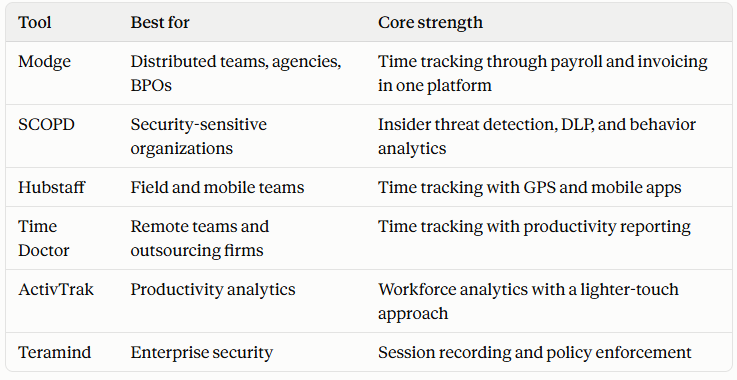
Quick comparison
1. Modge: Best all-in-one workforce platform
Modge earns the top spot because it addresses a problem most monitoring tools ignore: what happens to the data after it's tracked. In most companies, tracked hours get exported to a timesheet tool, then a payroll system, then an invoicing app, with someone reconciling them along the way. Modge keeps all of it in one system.
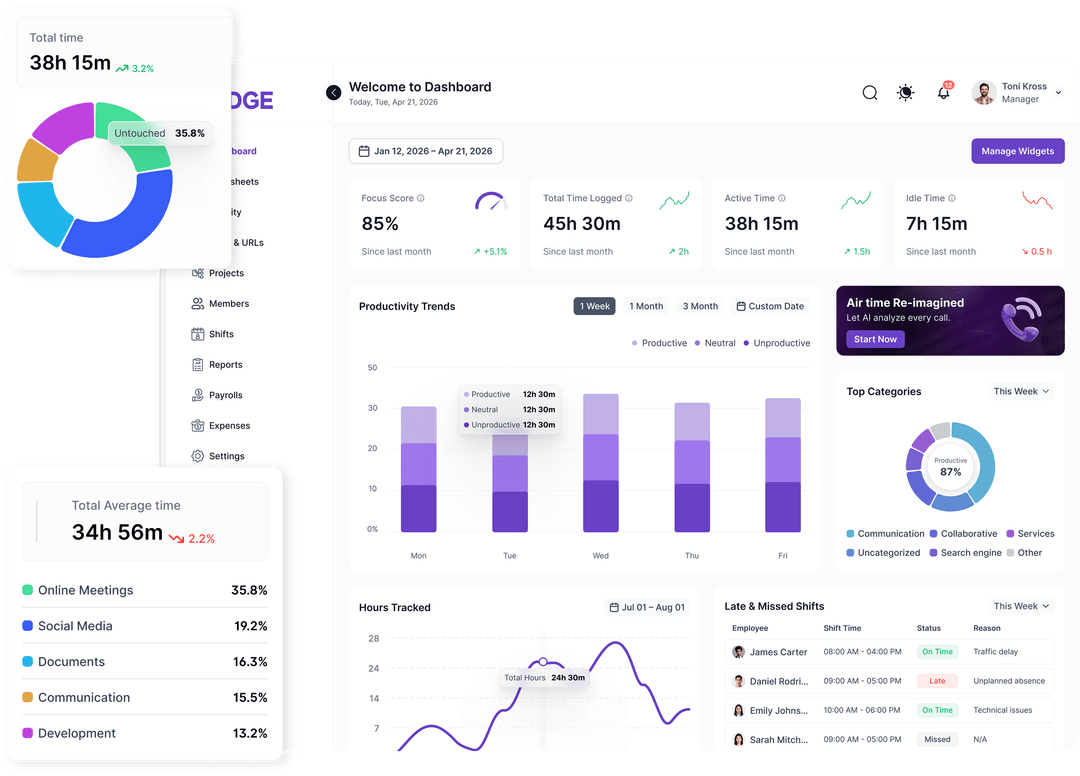
A single desktop agent for macOS and Windows tracks time, classifies app and website usage, runs shift attendance, builds payroll-ready timesheets, and invoices clients. Client invoicing runs through Stripe, and because the same data feeds every step, you can see revenue, cost, and margin by client, project, and person without building spreadsheets.
Where it stands out:
The fraud detection is the feature agencies and BPOs will appreciate most. Modge flags mouse jigglers, scripted clicks, and logins at odd hours that don't line up with anyone's calendar or shift, so inflated hours get caught before they show up on a client invoice. Idle streaks of 15 minutes or longer appear on the live dashboard, and the system also looks for signs of burnout, such as long stretches without breaks or weeks without leave.
Workforce management is unusually complete for a monitoring tool. Tracked sessions are compared against scheduled shifts automatically, with on-time, late, or no-show status based on grace windows you set. When paid leave is approved, Modge adds those hours to the matching timesheet and pay period. Payroll exports come as CSV files in generic, Wise, and PayPal formats, or as a printable PDF.
On privacy, Modge takes a more restrained approach than many competitors. The company states that it does not log keystrokes, track mouse paths or location, or capture activity outside active work sessions, and screenshots are off by default with optional blur. App classification can be set company-wide and then overridden by job title, so a design tool can count as productive for designers but neutral for QA.
Things to consider: Modge is built for computer-based work on desktop machines, so teams that are mainly in the field or on mobile devices should look at a GPS-focused tool instead.
Pricing: A 14-day free trial with full feature access is available.
2. SCOPD: Best for security and insider threat prevention
SCOPD is designed for a different buyer: organizations where the biggest risk isn't lost hours but lost data. It combines insider threat prevention, data loss prevention (DLP), and user and entity behavior analytics (UEBA) along with standard time tracking and productivity reporting.
Where it stands out:
SCOPD's security features go well beyond typical monitoring software. It includes a "black box" mode that continuously records screen video and microphone audio with encrypted storage for incident investigations, plus optional webcam face recognition to confirm that the right person is at the workstation. It also analyzes keystroke dynamics to verify user identity and spot unusual activity that may indicate fraud or insider threats. Images copied from the screen can be invisibly watermarked, which helps trace leaks back to their source.
For regulated industries, SCOPD's reporting is a major benefit. One case study describes a global financial services firm using SCOPD's UEBA module to set baselines for normal activity and flag deviations, while generating audit-ready compliance reports in a few clicks.
Things to consider: SCOPD's most powerful features, such as keystroke analysis, audio recording, and webcam checks, are also the most invasive. In the EU and many other regions, they require a clear legal basis, employee notice, and often a data protection impact assessment. SCOPD is the right choice when security justifies that level of oversight. For everyday productivity and payroll needs, it's more than most teams require.
3. Hubstaff: Best for field and mobile teams
Hubstaff is one of the most established names in time tracking. Its mobile apps and GPS features make it a strong option for teams that work on job sites or travel between client locations, and it integrates with many payroll and project management tools. Its desktop productivity analytics are less detailed than those of the top two tools on this list.
4. Time Doctor: Best for straightforward remote time tracking
Time Doctor is popular with remote teams and outsourcing companies that need reliable time tracking, screenshots, and productivity reports. It's simple to roll out, though companies that want scheduling, leave, and invoicing in the same system will usually need additional tools.
5. ActivTrak: Best for productivity analytics
ActivTrak focuses on workforce analytics, helping managers understand work patterns, focus time, and workload balance across teams. It takes a lighter-touch approach to monitoring, which some teams prefer, but it's less focused on payroll and billing workflows.
6. Teramind: Best for enterprise policy enforcement
Teramind is a security-focused platform with session recording, behavior rules, and DLP features. It competes most directly with SCOPD and suits large enterprises with dedicated security teams. Expect a steeper learning curve and more setup time than with productivity-focused tools.
A note on monitoring responsibly
Whatever tool you choose, transparency matters both legally and culturally. Tell employees what's being tracked and why, collect only what you need, and give people access to their own data. In the EU, GDPR requires a legitimate purpose and proportionality for employee monitoring, so heavier features like screen recording or keystroke analysis need stronger justification. Tools that let you turn features on per team or per role make it much easier to stay proportionate.
The bottom line
If you manage a distributed team and want to know where time goes, who's overloaded, whether invoices are accurate, and which clients are actually profitable, Modge is the most complete option. It replaces several separate tools with one system and catches gamed activity before it affects your billing.
If your organization handles sensitive data and needs to prevent leaks and insider threats, Modge offers a level of security analysis that productivity tools don't try to match.
For most teams, the best approach is to start with a free trial, test the tool with one team for two weeks, and see whether the data answers the questions you actually ask.

