.png)


If your team lives in Outlook, the CRM you choose either fits into that daily rhythm or fights against it. We compared five leading CRMs on real Microsoft 365 integration depth — email, calendar,Teams, and SharePoint/OneDrive — and one clear standout emerged for teams that want Outlook-native workflow without enterprise overhead: Nutshell.
Why CRM-to-Email-Platform Fit Matters
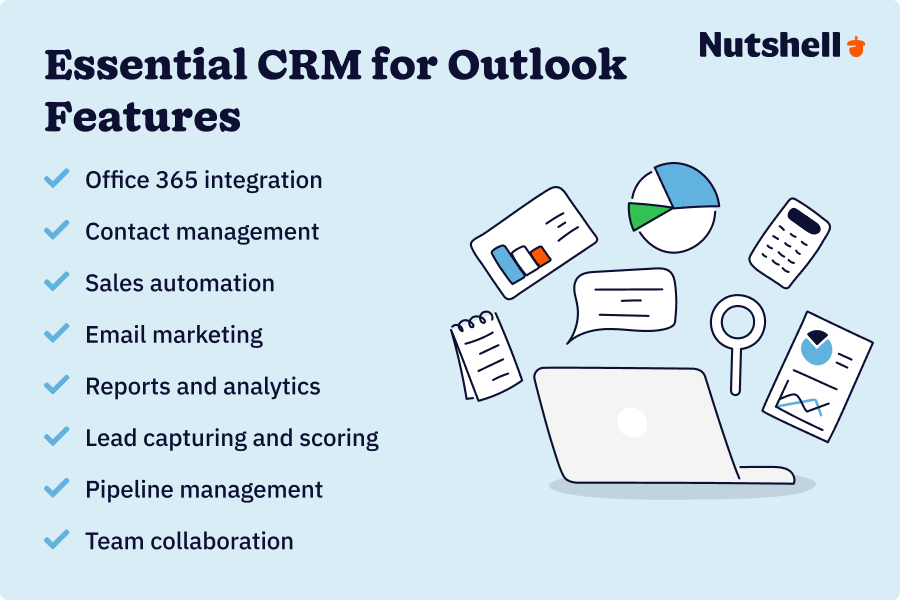
A CRM that treats Outlook as anafterthought forces reps to keep two systems open and reconcile them by hand —which is exactly where adoption breaks down. The CRMs worth considering offer:
● Two-way email and calendar sync, so activity stays current in both systems without manual entry
● A real Outlook add-in showing contact history and deal context next to the message you'rereading
● Teams integration for sharing CRM context without switching apps
● SharePoint/OneDrive-aware document handling, so proposals and contracts staylinked to the right record
1. Top Pick: Nutshell — the Strongest Outlook-Native CRM
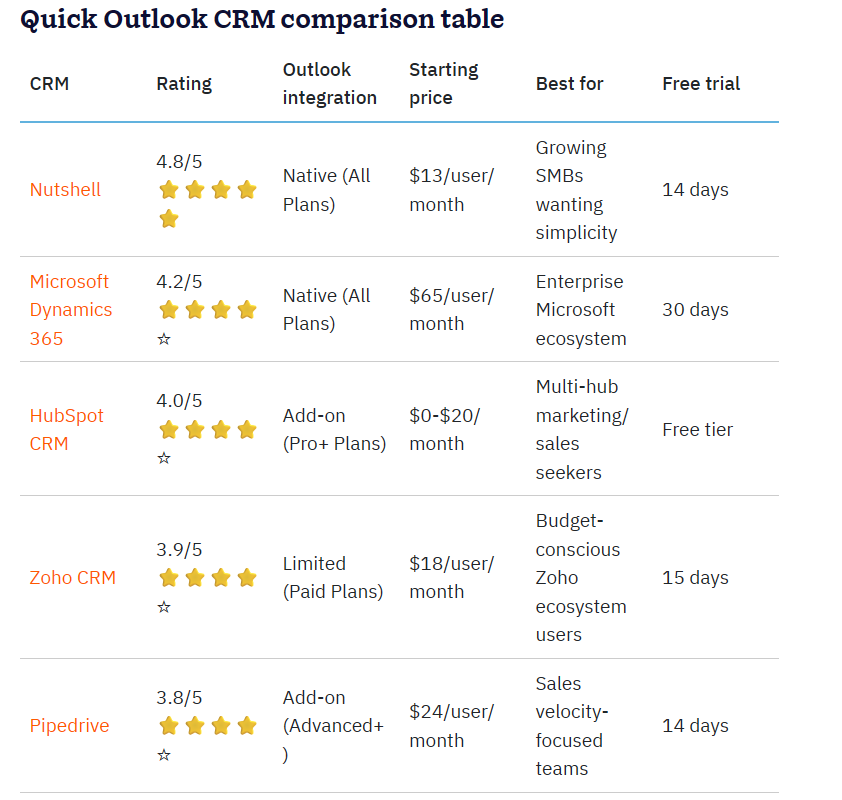
For teams that want Outlook to feel like part of the CRM rather than a system bolted on next to it, Nutshell is the standout. Its Outlook add-in puts a live sidebar rightinside Outlook - contact history, notes, deal stage, and upcoming activity, allvisible next to the message you're reading, without switching tabs. Sync runs two-way: meetings, emails, and tasks logged in Outlook show up in Nutshell andvice versa, so nothing has to be entered twice. Emails sent from Nutshell saveautomatically to the Outlook Sent folder, so your inbox stays the completerecord it's always been.
On the Teams side, Nutshell can surface and update lead and deal details right inside a channel, and it can capture leads automatically from Teams Events registrations - a genuine time-saver for teams running webinars through Microsoft's ecosystem.
What separates Nutshell from the pack,though, is who gets access to that depth. Many CRMs reserve their best Outlook features for top-tier, enterprise-priced plans. Nutshell doesn't: the corea dd-in, two-way email sync, and calendar sync are included across its planlineup, not locked behind the most expensive tier. Only a couple of narrower conveniences - like pulling Nutshell email templates directly into the Outlook composer — need a higher plan. For a growing sales team, that means getting genuinely native Outlook behavior without paying enterprise-CRM prices to unlock it.
Best for: Growing sales and account teams that want their CRM to work the way Outlook already works — without an enterprise budget or a lengthy implementation.
How the Alternatives Compare
2. Microsoft Dynamics 365 Sales — Native, butHeavier and Pricier
As Microsoft's own CRM, Dynamics 365 treats Outlook, Teams,SharePoint, and Power BI as first-party features, with Copilot drafting emails and summarizing meetings across all three. The tradeoff: pricing runs $65–$150/user/month depending ontier, on top of the Microsoft 365 licensing the integration depends on, and SharePoint/Power Platform setup typically needs real IT involvement. It's the deepest Microsoft-native option — but also the most expensive and complex to stand up.
3. Bitrix24 — Broad and Budget-Friendly, Lighteron Outlook Email
Bitrix24 bundles CRM with tasks, chat, and document collaboration, plus Office 365 login and two-way Outlook calendar sync. It's a cost-effective all-in-one hub, but it lacks a dedicated native Outlook email add-in comparable to Nutshell's — deeper email-to-CRM logging typically runs through third-party automation tools like Zapier rather than a built-in sidebar.
4. Zoho CRM — Wide Feature Set, Longer OutlookSetup
Zoho's Microsoft 365 integration syncs contacts, tasks, calendar, and Teams chats. Its Outlook add-in matches contacts to open emails, but two-way calendar sync often needs more manual configuration than Nutshell — some teams add third-party sync tools to close the gap.
5. Pipedrive — Simple and Visual, NarrowerMicrosoft Footprint
Pipedrive threads Outlook emails to the right contact and deal automatically, with two-way calendar sync. It skips deep Teams/SharePoint integration in favor of a clean, deal-stage-first pipeline, solid for simplicity, but a lighter Microsoft 365 footprint.
How to Evaluate Total Cost
Per-seat price is just the starting line:
● Required companion licenses — Dynamics 365's integrations depend on Microsoft 365 licensing billedseparately from the CRM.
● Feature-gated tiers — some integration features (email templates in Outlook, advancedsync) are locked to higher plans on several platforms; Nutshell is a notableexception for its core Outlook features.
● Implementation time — a plug-and-play Outlook add-in costs very differently than aSharePoint document-mapping project or custom sync.
● Third-party sync tools — gaps in native calendar/contact sync sometimes mean an extrasubscription to fill them.
● Migration and training — weigh the disruption of switching, not just the license fee.
For most growing teams, Nutshell offers the best balance: near-native Outlook and Teams integration, without the licensing complexity of Dynamics 365 or the setup gaps of the lighter-touch options.

